It's that time of year when we remember to give thanks for our blessings in life. I am excited to share that I recently embarked on a new journey in a full time Organizational Development Specialist role, and I am pursuing an Instructional Design Graduate Certificate through University of Wisconsin Stout's distance learning program. Thanks to all that continue to support me as I strive to achieve my goals and always remain positive!
Showing posts with label instructional design. Show all posts
Showing posts with label instructional design. Show all posts
Saturday, November 22, 2014
Good news and new directions
It's that time of year when we remember to give thanks for our blessings in life. I am excited to share that I recently embarked on a new journey in a full time Organizational Development Specialist role, and I am pursuing an Instructional Design Graduate Certificate through University of Wisconsin Stout's distance learning program. Thanks to all that continue to support me as I strive to achieve my goals and always remain positive!

Monday, March 12, 2012
Learning Development: Storyboard Elements
Storyboarding occurs during the Development phase of the ADDIE model of instructional design, after the audience has been analyzed and the learning sequence has been designed. Storyboards serve as the "blueprint" of the eLearning module prior to development within an authoring tool. This post outlines and explains the many elements indicative of a good storyboard.
Slide Title - Main idea of the slide for learner's visual cue
Audio - Slide by slide script plus audio cues and background sounds
Graphics - Verbal descriptions, sketches, or file names of pre-selected graphics
Video - File names of any pre-recorded video clips
Text - On-screen text for both content and learner instructions
Navigation - Location and description of navigational elements
Interactivity - Description of how graphics, texts, and audio appers on screen and behaves including timing, roll-overs, screen clicks, and drags and drops
Programmer Notes - Description of interface elements, required learner actions, and any specific instructions to integrate learning within desired delivery platform
A good storyboard can be reviewed and understood by the client, narrator, graphic artist, and/or producer as necessary for approval. Storyboards are often completed in either Microsoft Word or PowerPoint, and a great resource for templates can be found here on The eLearning Coach blog.
Resource:
Michaels & Associates Consulting & Training. Storyboarding Strategies for Effective eLearning. Retrieved from: http://bit.ly/41o0Xo
Slide Title - Main idea of the slide for learner's visual cue
Audio - Slide by slide script plus audio cues and background sounds
Graphics - Verbal descriptions, sketches, or file names of pre-selected graphics
Video - File names of any pre-recorded video clips
Text - On-screen text for both content and learner instructions
Navigation - Location and description of navigational elements
Interactivity - Description of how graphics, texts, and audio appers on screen and behaves including timing, roll-overs, screen clicks, and drags and drops
Programmer Notes - Description of interface elements, required learner actions, and any specific instructions to integrate learning within desired delivery platform
A good storyboard can be reviewed and understood by the client, narrator, graphic artist, and/or producer as necessary for approval. Storyboards are often completed in either Microsoft Word or PowerPoint, and a great resource for templates can be found here on The eLearning Coach blog.
Resource:
Michaels & Associates Consulting & Training. Storyboarding Strategies for Effective eLearning. Retrieved from: http://bit.ly/41o0Xo
Wednesday, February 29, 2012
Learning Development: Free eLearning Resources

Here is a concise list of websites to find free photos, sounds, and fonts for eLearning, web design, or graphic design projects.
Photos: Free Foto, iStockphoto, Stock.XCHNG, eLearning Stock, Every Stock Photo
Sounds: Freesound, Freeplay Music, Free Stock Music, Stock Music Boutique
Fonts: 1001 Free Fonts, Font Squirrel, Simply the Best Fonts, Google web fonts
Image credit:
http: http://freebabystuffforexpectingmothers.org/wp-content/uploads/2011/07/free-stuff.jpg
Thursday, February 23, 2012
Learning Development: Scenario Based Learning
Scenario-based learning (SBL) is learning that occurs by following success and failure paths within a context, situation, or social framework (Kindley, 2002) in which learners are able to explore a problem, event or issue [to] assist with problem-solving, decision making, and interpretation of data or observations in the real-world.
SBL is based on the concept of situated cognition, which is the idea that knowledge can't be known and fully understood independent of its context. (Kindley, 2002) Using real life scenarios heightens the relevance of the learning because the focus is more on application than plain theory. The learner, therefore, becomes an active participant in the learning process.
The basic elements of scenarios (often referred to as branching) are as follows:
• The learner is presented a problem in the form of text, images, audio, and/or video
• The learner has to choose how to respond to the problem
• Based on how they respond, the scenario branches down a path
• At the end of the path, the learner may be presented with feedback and the option to retry the scenario to improve their results
Research completed by Will Thalheimer, PhD suggests that the scenario-based approach to learning aids in the following:
• Supports Long Term Remembering
• Provides Memory Retrieval Practice
• Enables Context and Language Triggered Remembering
• Boosts Learning and Performance
By building scenarios where [learners] have to actively make decisions, you’re better able to help them transfer the information and make it more meaningful. (Kuhlman, 2009)
Resources:
Kindley, R. W. (2002). Scenario-based e-learning: a step beyond traditional e-learning. ASTD Online Magazine. Retrieved from: http://bit.ly/13oM3V
Kuhlman, T. (2009). 7 Tips for Better E-learning Scenarios. Rapid E-Learning Blog. Retrieved from: http://bit.ly/dlgaC
Thalheimer, W. (2009) Using Linguistically, Culturally, and Situationally Appropriate Scenarios to Support Real-World Remembering. Work-Learning Research Inc. Retrieved from:http://bit.ly/yLjpQA
SBL is based on the concept of situated cognition, which is the idea that knowledge can't be known and fully understood independent of its context. (Kindley, 2002) Using real life scenarios heightens the relevance of the learning because the focus is more on application than plain theory. The learner, therefore, becomes an active participant in the learning process.
The basic elements of scenarios (often referred to as branching) are as follows:
• The learner is presented a problem in the form of text, images, audio, and/or video
• The learner has to choose how to respond to the problem
• Based on how they respond, the scenario branches down a path
• At the end of the path, the learner may be presented with feedback and the option to retry the scenario to improve their results
Research completed by Will Thalheimer, PhD suggests that the scenario-based approach to learning aids in the following:
• Supports Long Term Remembering
• Provides Memory Retrieval Practice
• Enables Context and Language Triggered Remembering
• Boosts Learning and Performance
By building scenarios where [learners] have to actively make decisions, you’re better able to help them transfer the information and make it more meaningful. (Kuhlman, 2009)
Resources:
Kindley, R. W. (2002). Scenario-based e-learning: a step beyond traditional e-learning. ASTD Online Magazine. Retrieved from: http://bit.ly/13oM3V
Kuhlman, T. (2009). 7 Tips for Better E-learning Scenarios. Rapid E-Learning Blog. Retrieved from: http://bit.ly/dlgaC
Thalheimer, W. (2009) Using Linguistically, Culturally, and Situationally Appropriate Scenarios to Support Real-World Remembering. Work-Learning Research Inc. Retrieved from:http://bit.ly/yLjpQA
Tuesday, January 31, 2012
Learning Design: Working with SMEs
Subject Matter Experts (SMEs) are critical to analyzing audience needs, determining desired learning outcomes, determining the curriculum and sequence of learning activities, and writing content for scenarios, stories, or informational learning designs.

A few tips from my own experience working with SMEs include:
1) Identify your SMEs right away. It may be a good idea to not only have a content SME, but also a past trainee SME who can speak to the learner's experience, and/or a client SME, who can speak to desired learning outcomes.
2) Determine your SMEs availability; schedule meetings early and often. Since SMEs usually have full-time jobs, it is not uncommon for SMEs to be extremely busy individuals. Schedule meetings throughout your entire analysis and design process from the beginning.
3) Use your time with SMEs wisely. Prepare, prepare, prepare. Do your own research. Come up with your own content questions and send to the SME in advance. You also need to be sure SME sees value in the training effort, otherwise, they may also see little value in your meetings.
Ethan Edwards of Allen Interactions recommends the following questions as a great start for your first SME interaction:
- What do you expect learners to to do after completing the course that they can’t do now?
- What are the consequences if the learner fails to master the intended outcomes?
- Can you show me an active demonstration, a detailed simulation, or provide an opportunity to directly observe the desired performance?
- What specific performance mistakes do new learners make?
- What tools, resources, or help do successful performers use to do these tasks?
Lastly, for a humorous, though accurate, representation of how to handle the many SME personalities in a post titled, "How Important is the SME?" by Archana Nayaran, click here.
Resources:
Edwards, E. (2011) Analyze This: 5 Questions You Need to Ask. Allen Interactions E-Learning Leadership Blog. Retrieved from: http://bit.ly/hD88Mf
Image Credit: http://www.cjlt.ca/index.php/cjlt/article/viewFile/495/226/1417
A few tips from my own experience working with SMEs include:
1) Identify your SMEs right away. It may be a good idea to not only have a content SME, but also a past trainee SME who can speak to the learner's experience, and/or a client SME, who can speak to desired learning outcomes.
2) Determine your SMEs availability; schedule meetings early and often. Since SMEs usually have full-time jobs, it is not uncommon for SMEs to be extremely busy individuals. Schedule meetings throughout your entire analysis and design process from the beginning.
3) Use your time with SMEs wisely. Prepare, prepare, prepare. Do your own research. Come up with your own content questions and send to the SME in advance. You also need to be sure SME sees value in the training effort, otherwise, they may also see little value in your meetings.
Ethan Edwards of Allen Interactions recommends the following questions as a great start for your first SME interaction:
- What do you expect learners to to do after completing the course that they can’t do now?
- What are the consequences if the learner fails to master the intended outcomes?
- Can you show me an active demonstration, a detailed simulation, or provide an opportunity to directly observe the desired performance?
- What specific performance mistakes do new learners make?
- What tools, resources, or help do successful performers use to do these tasks?
Lastly, for a humorous, though accurate, representation of how to handle the many SME personalities in a post titled, "How Important is the SME?" by Archana Nayaran, click here.
Resources:
Edwards, E. (2011) Analyze This: 5 Questions You Need to Ask. Allen Interactions E-Learning Leadership Blog. Retrieved from: http://bit.ly/hD88Mf
Image Credit: http://www.cjlt.ca/index.php/cjlt/article/viewFile/495/226/1417
Wednesday, November 16, 2011
Learning Design: Writing Learning Objectives
Learning objectives can also be referred to as behavioral, instructional, or performance objectives, but in any case, a learning objective refers to an observable behavior or performance as the outcome of learning.
Learning objectives contain 3 components:
1. Condition - specify the circumstance, command, material, or direction given to initiate intended behavior
2. Behavior - Action desired (always a verb!)
3. Criterion - declarative statement to describe how well the behavior must be performed to satisy intent
Bloom's Taxonomoy (as seen below) is used to classify instructional activities based on their level of difficulty and is a great reference tool for writing learning objectives.

Here are some commonly used verbs for each of the six levels, listed in increasing order of the level of thinking skills required:
Knowledge- Define, Memorize, Repeat, Record, Label, Specify
Comprehension- Summarize, Describe, Explain, Identify, Translate
Application- Solve, Simulate, Apply, Illustrate, Exhibit
Analysis- Interpret, Compare, Categorize, Investigate, Discover
Synthesis- Plan, Imagine, Produce, Design, Predict
Evaluation- Judge, Assess, Measure, Conclude, Criticize
Resources:
NERC(2007) Guide to writing Learning Objectives. Retrieved from: http://www.nerc.com/files/Instructional_guide_writing_Objectives.pdf
Photo: http://www.odu.edu/educ/roverbau/Bloom/blooms_taxonomy.htm
Learning objectives contain 3 components:
1. Condition - specify the circumstance, command, material, or direction given to initiate intended behavior
2. Behavior - Action desired (always a verb!)
3. Criterion - declarative statement to describe how well the behavior must be performed to satisy intent
Bloom's Taxonomoy (as seen below) is used to classify instructional activities based on their level of difficulty and is a great reference tool for writing learning objectives.
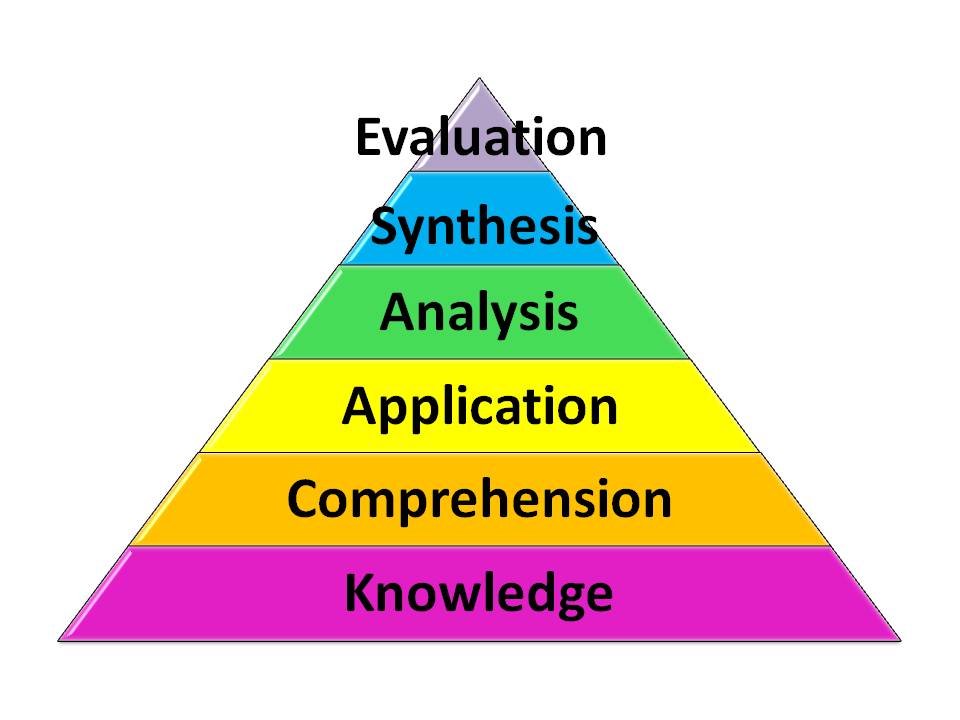
Here are some commonly used verbs for each of the six levels, listed in increasing order of the level of thinking skills required:
Knowledge- Define, Memorize, Repeat, Record, Label, Specify
Comprehension- Summarize, Describe, Explain, Identify, Translate
Application- Solve, Simulate, Apply, Illustrate, Exhibit
Analysis- Interpret, Compare, Categorize, Investigate, Discover
Synthesis- Plan, Imagine, Produce, Design, Predict
Evaluation- Judge, Assess, Measure, Conclude, Criticize
Resources:
NERC(2007) Guide to writing Learning Objectives. Retrieved from: http://www.nerc.com/files/Instructional_guide_writing_Objectives.pdf
Photo: http://www.odu.edu/educ/roverbau/Bloom/blooms_taxonomy.htm
Monday, October 31, 2011
Learning Design: Design Mapping Techniques
Design Mapping Techniques for Better Rapid eLearning Courses
Notes from #CETS11 - Chicago eLearning and Technology Showcase

Pictures and fonts are your "voice" in eLearning, and they set the tone and style of the learning experience. Design mapping is a great way to pre-design the visual layout of your eLearning. Elements of the design map include: Colors, Typography, People, Culture, Analogies, Metephors, Industry, and even Trade Magazines.
The above image, a design map template, and notes about design mapping from David Anderson himself can be found here: Using the Mind Map Template
Reference:
Anderson, D. (2011) Design Mapping Techniques for Better Rapid eLearning Courses. http://chicagoelearningshowcase.com/
Thursday, July 14, 2011
Learning Research: Graduate Level Capstone Project
I am currently pursuing my M.Ed. in Human Resources Education with a concentration in eLearning from the University of Illinois at Champaign-Urbana. One of the really great features of this 2 year online degree program is the flexibility and support offered to me for my Capstone Project. I am tasked to find an area in which I desire more experience, and then I propose, implement, and deliver a project fulfilling both my project goals and the needs of an organization that could benefit from my work.
To that end, I am seeking an opportunity to complete a short-term eLearning/ Instructional Design Project within an organization. The project would be proposed, implemented, and delivered along the following timeline:
August - Project Plan
September - Onsite/Remote Work
October - Onsite/Remote Work
November - Deliverables
It is my hope that this project would be a continuation of work completed in my Learning Technologies course, in which I collaborated with my colleagues to design and deliver an online introductory course in utilizing Social Media. That said, I have no industry/ content preference, and welcome the opportunity to have as rich of a learning experience as is possible. I would ideally like to expand upon my experience in the following areas:
Working with SME’s
Writing/ repurposing content for online delivery
Storyboarding
Designing custom graphics/ multi-media
Utilizing eLearning authoring tools
Please contact me if you, your organization, or a member of your PLN may be interested in working with me on this project. Resume, Transcripts, Coursework, and References available upon request.
To that end, I am seeking an opportunity to complete a short-term eLearning/ Instructional Design Project within an organization. The project would be proposed, implemented, and delivered along the following timeline:
August - Project Plan
September - Onsite/Remote Work
October - Onsite/Remote Work
November - Deliverables
It is my hope that this project would be a continuation of work completed in my Learning Technologies course, in which I collaborated with my colleagues to design and deliver an online introductory course in utilizing Social Media. That said, I have no industry/ content preference, and welcome the opportunity to have as rich of a learning experience as is possible. I would ideally like to expand upon my experience in the following areas:
Working with SME’s
Writing/ repurposing content for online delivery
Storyboarding
Designing custom graphics/ multi-media
Utilizing eLearning authoring tools
Please contact me if you, your organization, or a member of your PLN may be interested in working with me on this project. Resume, Transcripts, Coursework, and References available upon request.
Friday, February 25, 2011
Learning Research: eLearning Acronyms
Since the field of eLearning combines human resources, education, authoring, and design technology, it can be difficult to learn the lingo. Throughout my studies, I have been compiling a list of commonly used acronyms for my own learning and reference; I hope they can be useful to you as well.
ADL - Advance Distributed Learning
AU - Assignable Unit
CAI - Computer Assisted Instruction
CBT - Computer Based Training
CMS - Content Management System
DL - Distributed Learning
EPSS - Electronic Performance Support System
ICT - Information and Communication Technology
ILS - Immersive Learning Simulation
ISD - Instructional Design
ITS - Information Technology Services
LCMS - Learning Content Management System
LMS - Learning Management System
LTM - Long Term Memory
ML - Mental Load
NUI - Natural User Interface
OER - Open Educational Resources
PBL - Problem Based Learning
PLE - Personal Learning Environment
RLO - Reusable Learning Object
RCO - Reusable Content Object
SCORM - Sharable Content Object Reference Model
SLE - Social Learning Environments
SME - Subject Matter Expert
SoMe - Social Media
TEL - Technology Enhanced Learning
VLE - Virtual Learning Environment
WBT - Web Based Training
WM - Working Memory
This list represents only the most commonly used acronyms I have found in my studies; feel free to contact me for the comprehensive list. Thanks!
ADL - Advance Distributed Learning
AU - Assignable Unit
CAI - Computer Assisted Instruction
CBT - Computer Based Training
CMS - Content Management System
DL - Distributed Learning
EPSS - Electronic Performance Support System
ICT - Information and Communication Technology
ILS - Immersive Learning Simulation
ISD - Instructional Design
ITS - Information Technology Services
LCMS - Learning Content Management System
LMS - Learning Management System
LTM - Long Term Memory
ML - Mental Load
NUI - Natural User Interface
OER - Open Educational Resources
PBL - Problem Based Learning
PLE - Personal Learning Environment
RLO - Reusable Learning Object
RCO - Reusable Content Object
SCORM - Sharable Content Object Reference Model
SLE - Social Learning Environments
SME - Subject Matter Expert
SoMe - Social Media
TEL - Technology Enhanced Learning
VLE - Virtual Learning Environment
WBT - Web Based Training
WM - Working Memory
This list represents only the most commonly used acronyms I have found in my studies; feel free to contact me for the comprehensive list. Thanks!
Friday, January 21, 2011
Learning Management: ADDIE model
The ADDIE model for eLearning project management has five stages: Analyze, Design, Development, Implementation, and Evaluation.

Analyze: After determinging the scope, market and audience of your eLearning porgram, you must "clarify organizational and training program objectives" (Lynch & Roecker, 2007). This includes identifiying risks, opportunities, budget restrictions, timing, and personnel needed.
Design: Objectives are transformed into a program structure including the sequence, durantion, and pace of proposed learning modules. Learning methods are identified, and administrative requirements are defined. This is the storyboard and instructional design phase.
Development: Creation of infrastructure, content related communication packs, multimedia, reference guides, job aids, necessary additional resources, and assessment criteria.
Implementation: Install all developed materials to delivery channels, set up administrative databases, roll out program communication, schedule learning sessions, and implement training.
Evaluation: Collect all training and project evaluation data, review participant and project performance for report to stakeholders. You should be able to deliver a program and project evaluation report upon completion of the evaluation.
Reference:
Lynch, M. M., & Roecker, J. (2007.) Project managing eLearning: A handbook for successful design, delivery, and management. Routledge. Chapter 1.
Analyze: After determinging the scope, market and audience of your eLearning porgram, you must "clarify organizational and training program objectives" (Lynch & Roecker, 2007). This includes identifiying risks, opportunities, budget restrictions, timing, and personnel needed.
Design: Objectives are transformed into a program structure including the sequence, durantion, and pace of proposed learning modules. Learning methods are identified, and administrative requirements are defined. This is the storyboard and instructional design phase.
Development: Creation of infrastructure, content related communication packs, multimedia, reference guides, job aids, necessary additional resources, and assessment criteria.
Implementation: Install all developed materials to delivery channels, set up administrative databases, roll out program communication, schedule learning sessions, and implement training.
Evaluation: Collect all training and project evaluation data, review participant and project performance for report to stakeholders. You should be able to deliver a program and project evaluation report upon completion of the evaluation.
Reference:
Lynch, M. M., & Roecker, J. (2007.) Project managing eLearning: A handbook for successful design, delivery, and management. Routledge. Chapter 1.
Wednesday, January 12, 2011
Learning Design: Interactive Multimodal Environments
“The most effective learning environments are those that combine verbal and non-verbal representations of knowledge using mixed-modality presentations.” (Mayer & Moreno, 2007) Multimodal learning environments involve both the auditory and visual sensory modalities of the learner. Interactivity, the characteristic of multidirectional communication, has the ability to further increase learning in a multimodal environment. Along a continuum of interactivity, learning environments can range from highly interactive to non-interactive. Based on the knowledge construction view of learning, interactive multimodal learning environments “guide [the] learner to actively make sense of the instructional materials”, toward promoting “deep cognitive processing.” (Mayer & Moreno, 2007)
Mayer & Moreno list the 5 types of interactivity as:
Dialoguing- ask question/ receive answer or give answer/ receive feedback
Controlling- determine pace and/or order of presentation
Manipulating- control parameters, zoom in or out, move on screen objects
Searching- find new content material through query, range of options, and selection
Navigating- select content areas from various available information sources
Clark & Mayer list several principles for multimodal learning as:
Contiguity- Present text and graphics in an integrated fashion
Redundancy - Avoid on screen text and simultaneous narration
Coherence - Avoid content inessential to instructional goal
Personalization- Use conversational style
Segmenting - Break complex lessons into segments
Pre-training - Elliminate extraneous processing by providing some material in advance
Reference:
Moreno, R., & Mayer, R. (2007). Interactive multimodal learning environments. Educational Psychology Review, 19, 309–326.
Clark, R., and Mayer, R. (2007). e-Learning and the Science of Instruction. 2nd edition. San Francisco: Pfeiffer.
Mayer & Moreno list the 5 types of interactivity as:
Dialoguing- ask question/ receive answer or give answer/ receive feedback
Controlling- determine pace and/or order of presentation
Manipulating- control parameters, zoom in or out, move on screen objects
Searching- find new content material through query, range of options, and selection
Navigating- select content areas from various available information sources
Clark & Mayer list several principles for multimodal learning as:
Contiguity- Present text and graphics in an integrated fashion
Redundancy - Avoid on screen text and simultaneous narration
Coherence - Avoid content inessential to instructional goal
Personalization- Use conversational style
Segmenting - Break complex lessons into segments
Pre-training - Elliminate extraneous processing by providing some material in advance
Reference:
Moreno, R., & Mayer, R. (2007). Interactive multimodal learning environments. Educational Psychology Review, 19, 309–326.
Clark, R., and Mayer, R. (2007). e-Learning and the Science of Instruction. 2nd edition. San Francisco: Pfeiffer.
Wednesday, November 24, 2010
Learning Design: Activities
There are 3 types of activites ISDs need to incorporate in virtual learning programs: Absorb, Do, and Connect. Ask yourself, what knowledge does the learner need to absorb? What skills does the learner need to do/perform? What area of life does the learner need to connect the knowledge and skills to?
Absorbing information can be done through presentations, storytelling, reading,and/or real or virtual field trips. Multimedia is often a great way to engage students in order to be sure they process given information. Use PPt, videos, podcasts, live lecture and discussion, or a live demonstration.
Do activities transform absorbed information into knowledge and skills through practice, hands on tasks, and teamwork. Learners can discover trends and principles through case study and role playing. Simulated environments can help learners make decisions and take action.
Connect newly found skills to real life by thinking deeply, researching, and referencing the application of knowledge. Learners are encouraged to openly consider the impact, context, and concept involved in their studies. They summarize and evaluate information, consult various resources, and create original work and ideas of their own.
Recommeded Activity Allocation
Absorb (extract and comprehend knowledge) - 40%
Do (excersize/automate/explore acquired abilites)- 50%
Connect (trigger conceptual breakthroughs/ relate to prior learning)- 10%
Reference
Currently reading: E-learning by Design By William Horton
Online @ http://www.horton.com/portfolioactivities.aspx
Absorbing information can be done through presentations, storytelling, reading,and/or real or virtual field trips. Multimedia is often a great way to engage students in order to be sure they process given information. Use PPt, videos, podcasts, live lecture and discussion, or a live demonstration.
Do activities transform absorbed information into knowledge and skills through practice, hands on tasks, and teamwork. Learners can discover trends and principles through case study and role playing. Simulated environments can help learners make decisions and take action.
Connect newly found skills to real life by thinking deeply, researching, and referencing the application of knowledge. Learners are encouraged to openly consider the impact, context, and concept involved in their studies. They summarize and evaluate information, consult various resources, and create original work and ideas of their own.
Recommeded Activity Allocation
Absorb (extract and comprehend knowledge) - 40%
Do (excersize/automate/explore acquired abilites)- 50%
Connect (trigger conceptual breakthroughs/ relate to prior learning)- 10%
Reference
Currently reading: E-learning by Design By William Horton
Online @ http://www.horton.com/portfolioactivities.aspx
Subscribe to:
Posts (Atom)