Personal Reflection Exercise:
What does it mean to be innovative?
How does innovation apply to education in the U.S.?
What are the attributes of innovative ideas and persons?
What elements make an innovation successful?
Here are some great examples of current and future innovations in learning and training:
Personalized textbooks with the Utah open textbooks project
The future of mobile technology: Nokia HumanForm
The future of business at Microsoft in 2019
Personal Learning Environments at Coldwell Banker University
Mechanic training using Augmented reality at BMW
Thursday, December 8, 2011
Wednesday, November 16, 2011
Learning Design: Writing Learning Objectives
Learning objectives can also be referred to as behavioral, instructional, or performance objectives, but in any case, a learning objective refers to an observable behavior or performance as the outcome of learning.
Learning objectives contain 3 components:
1. Condition - specify the circumstance, command, material, or direction given to initiate intended behavior
2. Behavior - Action desired (always a verb!)
3. Criterion - declarative statement to describe how well the behavior must be performed to satisy intent
Bloom's Taxonomoy (as seen below) is used to classify instructional activities based on their level of difficulty and is a great reference tool for writing learning objectives.

Here are some commonly used verbs for each of the six levels, listed in increasing order of the level of thinking skills required:
Knowledge- Define, Memorize, Repeat, Record, Label, Specify
Comprehension- Summarize, Describe, Explain, Identify, Translate
Application- Solve, Simulate, Apply, Illustrate, Exhibit
Analysis- Interpret, Compare, Categorize, Investigate, Discover
Synthesis- Plan, Imagine, Produce, Design, Predict
Evaluation- Judge, Assess, Measure, Conclude, Criticize
Resources:
NERC(2007) Guide to writing Learning Objectives. Retrieved from: http://www.nerc.com/files/Instructional_guide_writing_Objectives.pdf
Photo: http://www.odu.edu/educ/roverbau/Bloom/blooms_taxonomy.htm
Learning objectives contain 3 components:
1. Condition - specify the circumstance, command, material, or direction given to initiate intended behavior
2. Behavior - Action desired (always a verb!)
3. Criterion - declarative statement to describe how well the behavior must be performed to satisy intent
Bloom's Taxonomoy (as seen below) is used to classify instructional activities based on their level of difficulty and is a great reference tool for writing learning objectives.
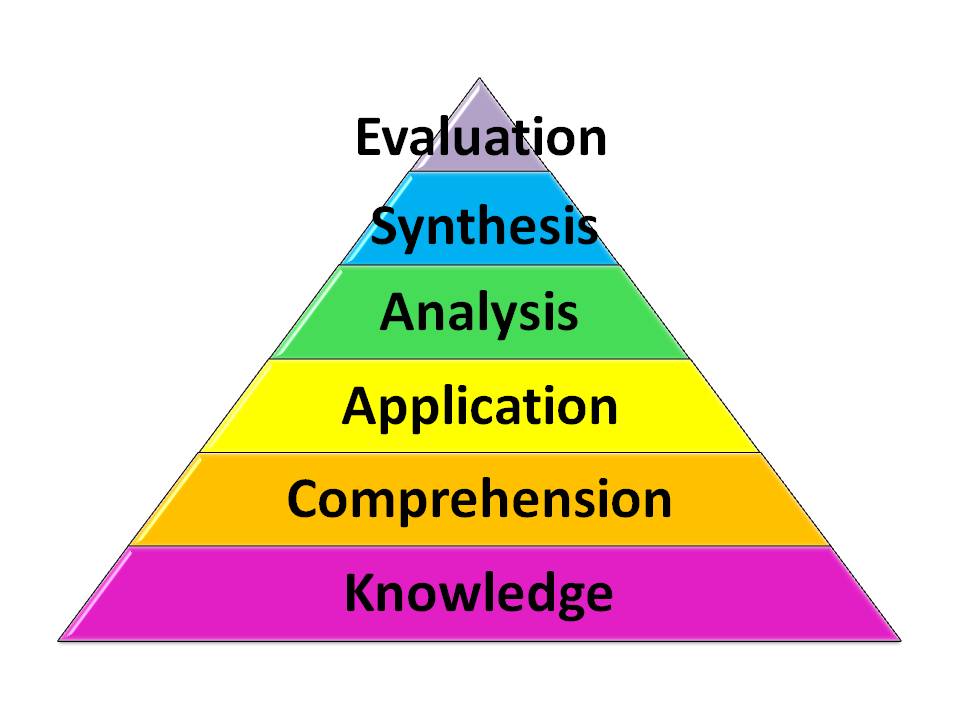
Here are some commonly used verbs for each of the six levels, listed in increasing order of the level of thinking skills required:
Knowledge- Define, Memorize, Repeat, Record, Label, Specify
Comprehension- Summarize, Describe, Explain, Identify, Translate
Application- Solve, Simulate, Apply, Illustrate, Exhibit
Analysis- Interpret, Compare, Categorize, Investigate, Discover
Synthesis- Plan, Imagine, Produce, Design, Predict
Evaluation- Judge, Assess, Measure, Conclude, Criticize
Resources:
NERC(2007) Guide to writing Learning Objectives. Retrieved from: http://www.nerc.com/files/Instructional_guide_writing_Objectives.pdf
Photo: http://www.odu.edu/educ/roverbau/Bloom/blooms_taxonomy.htm

Saturday, November 12, 2011
Learning Tool: AdeLE
Adaptive eLearning with Eye-tracking
Adaptive eLearning is a hot topic right now. Perhaps you have heard it referred to as adaptive training, intelligent tutoring system (ITS), or cognitive tutor, but in any case, adaptive eLearning is a learning system that intelligently adapts learning content to suit learner needs via a computer.
To learn more about adaptive learning, there is a great video and adaptive learning samples posted on the Adaptive eLearning website at UNSW.
In this post, however, I would like to take adaptive eLearning to the next level and advocate for the use of real-time eye-tracking in combination with the content-analysis tracking used by basic adaptive eLearning systems.
Lead by a research team in Austria, a protoype for Adaptive eLearning with eye-tracking is being developed. It is aptly named "AdeLE".
Resources:
Pivec, M, Trummer, & C. Pripfl, J. (2006). Eye-Tracking Adaptable e-Learning and Content Authoring Support. Informatica, 30, 83-86
Al-Khalifa, H.S. & George, R.P. (2010) Eye Tracking and e-Learning: Seeing Through Your Students' Eyes. ELearn Magazine, June 2010.
Gütl, C., Pivec, M., Trummer, C., García-Barrios, V.M., Mödritscher, F., Pripfl, J., & Umgeher, M. (2005). AdeLE (Adaptive e-Learning with Eye-Tracking): Theoretical Background, System Architecture and Application Scenarios. EURRODL 12-05.
Adaptive eLearning is a hot topic right now. Perhaps you have heard it referred to as adaptive training, intelligent tutoring system (ITS), or cognitive tutor, but in any case, adaptive eLearning is a learning system that intelligently adapts learning content to suit learner needs via a computer.
To learn more about adaptive learning, there is a great video and adaptive learning samples posted on the Adaptive eLearning website at UNSW.
In this post, however, I would like to take adaptive eLearning to the next level and advocate for the use of real-time eye-tracking in combination with the content-analysis tracking used by basic adaptive eLearning systems.
Lead by a research team in Austria, a protoype for Adaptive eLearning with eye-tracking is being developed. It is aptly named "AdeLE".
Resources:
Pivec, M, Trummer, & C. Pripfl, J. (2006). Eye-Tracking Adaptable e-Learning and Content Authoring Support. Informatica, 30, 83-86
Al-Khalifa, H.S. & George, R.P. (2010) Eye Tracking and e-Learning: Seeing Through Your Students' Eyes. ELearn Magazine, June 2010.
Gütl, C., Pivec, M., Trummer, C., García-Barrios, V.M., Mödritscher, F., Pripfl, J., & Umgeher, M. (2005). AdeLE (Adaptive e-Learning with Eye-Tracking): Theoretical Background, System Architecture and Application Scenarios. EURRODL 12-05.
Monday, October 31, 2011
Learning Design: Design Mapping Techniques
Design Mapping Techniques for Better Rapid eLearning Courses
Notes from #CETS11 - Chicago eLearning and Technology Showcase

Pictures and fonts are your "voice" in eLearning, and they set the tone and style of the learning experience. Design mapping is a great way to pre-design the visual layout of your eLearning. Elements of the design map include: Colors, Typography, People, Culture, Analogies, Metephors, Industry, and even Trade Magazines.
The above image, a design map template, and notes about design mapping from David Anderson himself can be found here: Using the Mind Map Template
Reference:
Anderson, D. (2011) Design Mapping Techniques for Better Rapid eLearning Courses. http://chicagoelearningshowcase.com/
Subscribe to:
Posts (Atom)