It's that time of year when we remember to give thanks for our blessings in life. I am excited to share that I recently embarked on a new journey in a full time Organizational Development Specialist role, and I am pursuing an Instructional Design Graduate Certificate through University of Wisconsin Stout's distance learning program. Thanks to all that continue to support me as I strive to achieve my goals and always remain positive!
Saturday, November 22, 2014
Good news and new directions
It's that time of year when we remember to give thanks for our blessings in life. I am excited to share that I recently embarked on a new journey in a full time Organizational Development Specialist role, and I am pursuing an Instructional Design Graduate Certificate through University of Wisconsin Stout's distance learning program. Thanks to all that continue to support me as I strive to achieve my goals and always remain positive!

Wednesday, July 30, 2014
Project Management: Enterprise Surveys
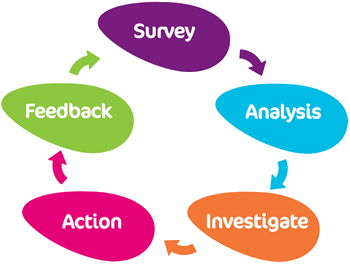
Here is a broad outline of the various decisions/considerations in the survey cycle:
- Survey Format/Web/Paper - Does your target audience have web/email access and/or can you provide computer kiosks? Paper should be avoided due to high cost and strict logistics.
- Languages/Translations - How many languages, who will coordinate translations, and how much time will be needed for the entire process, including quality control checks?
- Timeframe/Length of Data Collection - When do you want the survey to launch: Annually? Bi-Annually? Quarterly? How long will each data collection window be: 2 weeks? 3 weeks?
- Survey Content/Paths/Design - What are your current business successes/challenges and how will survey content align with feedback/data collection results you hope to gain? Will survey content be universal, or will you tailor content for different levels/departments?
- Confidentiality/Ethics/Access - Will the survey be anonymous or individually authenticated? What level of confidentiality is required by all parties, and how will confidentiality affect end-user response rates? What is the minimum number of participants required to share results?
- Branding/Logo/Communications - Will you use existing templates, or require custom branding and design? How will you communicate to your audience before, during, and after the survey?
- Participant Files/Hierarchies - Will any participant information (Name, Email, Level, Department, etc.) be provided in advance, or will it be collected during the survey? Will you need to produce participant hierarchies for response rate or reporting purposes?
- Qualitative/Quantitative Data Collection - Will survey data be collected in quantitative scales (i.e. rating of 1-10 or Likert scale), or will survey data include qualitative open ended comment responses that need to be analyzed for word groupings and themes?
- Data Analysis/Cuts/Graphic Views - What statistical data analyses will be performed, and how will the results be presented: bar charts, line graphs, heat maps, conditionally formatted tables, infographics, word clouds, etc.?
- Online/Offline Reporting/Delivery Method - Who will receive data analysis reports and how will access be monitored? How will data analysis reports be delivered: via internal or external shared website, mobile device, email/paper?
- Training/Help Desk Support/Action Planning - Will the end-user need to be trained to access the survey or read reports, will a dedicated help desk be required at any stage in the process, and what will be required of users receiving reports post-survey to address the findings and outcomes?
Saturday, June 28, 2014
Human Resources: Workforce Innovation
"We now have the ability to recognize and analyze trends that can literally predict behavior, [...] match capabilities to marketplace needs, [...] and act on time-tested insights to drive business outcomes" (IBM, 2013).
Workforce Surveys have such broad reaching capabilities. With the right content, confidentiality, and response rates, organizations can equip themselves with the data needed to drive the most important business decisions. If this topic intrigues you, I encourage you to download the CEB whitepaper 'Rethinking the Workforce Survey' here - http://bit.ly/1qWtEW1.
In the emerging work environment, we should focus on using survey data to determine how workforces use technology to network and collaborate among teams, departments, branches, etc. Data collected about leaders is often upward feedback, and we determine how leaders are able to work successfully within their teams, but without a 360 degree perspective, the data might not be so informative about how successful a leader works with leaders of other networked teams.
"What if organizational interventions were designed around informal networks of employees?" (Mastrangelo, 2013). Network performance is made up of individual performance within the network, and identifying the competencies of the most highly networked leaders is critical to organizational and leadership development. There needs to be strategic, cultural, and goal alignment across teams and it begins with a focus on network competencies and technology.
Resources:
Mastrangelo, P. CEB (2013) 'Want Employees to Work Smarter? 3 Ways to Foster Network Performance' http://bit.ly/1qENyT7
IBM (2013) 'Redesigning work creates a smarter workforce' http://ibm.co/1vhTRfx
Workforce Surveys have such broad reaching capabilities. With the right content, confidentiality, and response rates, organizations can equip themselves with the data needed to drive the most important business decisions. If this topic intrigues you, I encourage you to download the CEB whitepaper 'Rethinking the Workforce Survey' here - http://bit.ly/1qWtEW1.
In the emerging work environment, we should focus on using survey data to determine how workforces use technology to network and collaborate among teams, departments, branches, etc. Data collected about leaders is often upward feedback, and we determine how leaders are able to work successfully within their teams, but without a 360 degree perspective, the data might not be so informative about how successful a leader works with leaders of other networked teams.
"What if organizational interventions were designed around informal networks of employees?" (Mastrangelo, 2013). Network performance is made up of individual performance within the network, and identifying the competencies of the most highly networked leaders is critical to organizational and leadership development. There needs to be strategic, cultural, and goal alignment across teams and it begins with a focus on network competencies and technology.
Resources:
Mastrangelo, P. CEB (2013) 'Want Employees to Work Smarter? 3 Ways to Foster Network Performance' http://bit.ly/1qENyT7
IBM (2013) 'Redesigning work creates a smarter workforce' http://ibm.co/1vhTRfx
Thursday, June 19, 2014
Workforce Surveys: Introduction

Time to reflect on my experience with CEB Workforce Surveys & Analytics to this point. Sharing this knowledge is certainly past due, but I hope you find my insights valuable none-the-less! To start, I work with two distinct types of surveys:
Employee Opinion Surveys (EOS)- Sample or census survey in which content is used to collect employee opinions about key business strategies, decisions, processes, etc. and determine the effectiveness and alignment of these initiatives via the performance of the business and the engagement of its employees.
360 Degree Feedback Surveys (360) - Sample survey in which leaders gain 360 degree feedback from multiple levels of the organization (upward, downward, peer). Content is specific to assessing an individual in relation to the key professional development and leadership metrics of the organization.
Consultants work to develop survey content/response scales/metrics that align with an individual business's needs. In almost all cases, individual questions are categorized into mega themes, and open-ended questions are coded into mega topics for reporting purposes.
Survey data is often compared to historical data, internal benchmark data, and/or external normative data in order to gauge positive and/or negative progress on company initiatives and compare results to industry best practices.
Thursday, August 30, 2012
Learning Management: Graduation

I received my M.Ed in Human Resources Education with a concentration in eLearning from UIUC. I want to thank everyone who has helped me reach this goal, including managers, co-workers, professors, fellow students, family, and friends.
The Master's program coursework included Project Management, Learning Systems Design, Instructional Design, Adult Learning Theory, Program Evaluation and Research, Web 2.0, Computer Ethics, Innovations in eLearning. I was also a member and volunteer of the Chicagoland Chapter of the American Society for Training and Development (CCASTD).
Since graduation, I was certified as an eLearning Instructor with the Princeton Review, and I accepted a full-time position with CEB (formerly Valtera). At CEB, I will be managing small to mid-size employee engagement survey projects, including all project management tasks, data analysis, and reporting. I am very excited about this opportunity, and I hope to periodically share my new found knowledge and experiences with everyone here.
Thursday, April 19, 2012
Learning Evaluation: Learning Analytics
Learning analytics is the use of intelligent data, learner-produced data, and analysis models to discover information and social connections, and to predict and advise on learning. (Siemens, 2010) An analytics system includes the information repository itself, as well as a means for data optimization, predictive modeling, forecasting, and statistical analysis.
According to Ferguson (2012), there are 3 factors driving the development of learning analytics in higher education. They are:
1) Big Data
2) Online Learning
3) Political Concerns
When implemeting learning analytics, the following should be considered:
- Methods for visualizing data that are easy to use and understand
- Personalized dashboards
- Standards for the structure of data
- Ethics, privacy, and ownership of data
Data warehouses and the cloud make it possible to collect, manage, and maintain massive amounts of information, and technology platforms can now help us turn a mass of numbers into meaningful patterns. "Data mining uses descriptive and inferential statistics (e.g., moving averages, correlations, and regressions) and complex functions (e.g., graph analysis, market basket analysis, and tokenization) to look inside those patterns for actionable information. Predictive techniques (e.g., neural networks and decision trees) help anticipate behavior and events."(Wagner & Ice, 2012)
Learning Analytics is here to stay. Information gleaned from transactions and interactions in our online lives that can then be summarized in reports in order to provide us with intelligence for making decisions in a shift toward more desirable behavior is extremely valuable!
Resources:
Ferguson, R. (2012). The State Of Learning Analytics in 2012: A Review and Future Challenges. Technical Report KMI-12-01, Knowledge Media Institute, The Open University, UK. http://kmi.open.ac.uk/publications/techreport/kmi-12-01
Siemens, G. (2010). What are learning analytics?. Retrieved from: http://www.elearnspace.org/blog/2010/08/25/what-are-learning-analytics/
Wagner, E., & Ice, P. (2012). Data changes everything: delivering on the promise of learning analytics in higher education. EDUCAUSE Review, July/August. Retrieved from http://www.educause.edu/ero/article/data-changes-everything-delivering-promise-learning-analytics-higher-education.
According to Ferguson (2012), there are 3 factors driving the development of learning analytics in higher education. They are:
1) Big Data
2) Online Learning
3) Political Concerns
When implemeting learning analytics, the following should be considered:
- Methods for visualizing data that are easy to use and understand
- Personalized dashboards
- Standards for the structure of data
- Ethics, privacy, and ownership of data
Data warehouses and the cloud make it possible to collect, manage, and maintain massive amounts of information, and technology platforms can now help us turn a mass of numbers into meaningful patterns. "Data mining uses descriptive and inferential statistics (e.g., moving averages, correlations, and regressions) and complex functions (e.g., graph analysis, market basket analysis, and tokenization) to look inside those patterns for actionable information. Predictive techniques (e.g., neural networks and decision trees) help anticipate behavior and events."(Wagner & Ice, 2012)
Learning Analytics is here to stay. Information gleaned from transactions and interactions in our online lives that can then be summarized in reports in order to provide us with intelligence for making decisions in a shift toward more desirable behavior is extremely valuable!
Resources:
Ferguson, R. (2012). The State Of Learning Analytics in 2012: A Review and Future Challenges. Technical Report KMI-12-01, Knowledge Media Institute, The Open University, UK. http://kmi.open.ac.uk/publications/techreport/kmi-12-01
Siemens, G. (2010). What are learning analytics?. Retrieved from: http://www.elearnspace.org/blog/2010/08/25/what-are-learning-analytics/
Wagner, E., & Ice, P. (2012). Data changes everything: delivering on the promise of learning analytics in higher education. EDUCAUSE Review, July/August. Retrieved from http://www.educause.edu/ero/article/data-changes-everything-delivering-promise-learning-analytics-higher-education.
Learning Tools: Twitter

The new network economy is about communities, collaboration, peer production, and user-generated content. As companies evolve within this new network economy, demands are being placed on internal learning and development departments to assist employees with mitigating the impact of increasing job demands, global workforce redistribution, cross functional projects, and formal information overload. (Pontefract, 2011) Given that many companies are also still burdened financially by recent economic crises in the U.S., learning and development departments are also under pressure to implement extremely cost-effective training solutions.
Due to these economic constraints, many companies are now turning to Web 2.0 tools, such as Twitter, as a means of cultivating formal, social, and informal learning in the workplace. The Twitter platform can be utilized at no cost to the account holder, is accessible anytime, and is especially good for mobile, on-the-go people who can learn anywhere. (Galagan, 2009)
When micro-blogging is encouraged within a company, it can help not only to address on-going employee professional development and training needs, but it also helps to create a company culture in which there is: (Pontefract, 2011)
• Better understanding of the organization across many teams & projects
• Personalization among employees and senior leaders
• Engagement and the feeling that everyone's opinion matters
• Information provided timely, be it formal or social/ community driven
Trainers should not only encourage the use of Twitter among employees for informal learning, but for formal learning as well. Twitter's interface provides a unique presentation platform for storing and sharing learning content and can be used as a delivery platform for training. The favorites tab is the key to designing a course (…) and critical to organizing the delivery of training. “Favorited” content that can be compiled for courses includes: (Wing, 2011)
• Hyperlinks
• Video Links
• Photo Links
• Geo-tagging Links
An example of using Twitter as a platform for course delivery and also a course on the topic, Building a Training Course in Twitter, can be found at: http://twitter.com/#!/ISD20/favorites
Resources:
Galagan, P. (2009) Twitter as a Learning Tool… really. ASTD T+D Magazine. Retrieved from: http://www.astd.org/LC/2009/0409_galagan.htm
Pontefract, D (2011) Micro-blogging is Good for Leadership, Good for Culture. Brave New Org. Retrieved from: http://www.danpontefract.com/?p=267
Wing, T. (2011) App Fusion: Twaining in Twitter. Learning Solutions Magazine. Retrieved from: http://www.learningsolutionsmag.com/articles/623/app-fusion-twaining-in-twitter
Tuesday, March 20, 2012
Learning Management: Project Planning

This post explores the elements of the initiation and planning stages of project management. As outlined below, the following information should be included in a project proposal and project plan.
Project Proposal
Purpose - Organizational goal
Scope - Breadth and depth of project
Resources - Content and/or personnel assistance needed
Anticipated Outcomes - Deliverables and benefits provided to organization
Constraints - Internal and External
Personal Commitment - Confidentiality and personal standards of conduct
Project Plan
Overview - Describe project concept and history
Phases - Data collection, data analysis, needs assessment, interim reporting
Action Steps - Decisions, meetings, deliverables, review points
Tasks - Chronological sequence of events to complete action steps
Instruments - Schedules, software, surveys, handouts
Cost Estimates - Estimation of resources necessary to complete project
Project reporting will be outlined in a future post.
Image Credit: http://www.mpmm.com/project-management-methodology.php
Monday, March 12, 2012
Learning Development: Storyboard Elements
Storyboarding occurs during the Development phase of the ADDIE model of instructional design, after the audience has been analyzed and the learning sequence has been designed. Storyboards serve as the "blueprint" of the eLearning module prior to development within an authoring tool. This post outlines and explains the many elements indicative of a good storyboard.
Slide Title - Main idea of the slide for learner's visual cue
Audio - Slide by slide script plus audio cues and background sounds
Graphics - Verbal descriptions, sketches, or file names of pre-selected graphics
Video - File names of any pre-recorded video clips
Text - On-screen text for both content and learner instructions
Navigation - Location and description of navigational elements
Interactivity - Description of how graphics, texts, and audio appers on screen and behaves including timing, roll-overs, screen clicks, and drags and drops
Programmer Notes - Description of interface elements, required learner actions, and any specific instructions to integrate learning within desired delivery platform
A good storyboard can be reviewed and understood by the client, narrator, graphic artist, and/or producer as necessary for approval. Storyboards are often completed in either Microsoft Word or PowerPoint, and a great resource for templates can be found here on The eLearning Coach blog.
Resource:
Michaels & Associates Consulting & Training. Storyboarding Strategies for Effective eLearning. Retrieved from: http://bit.ly/41o0Xo
Slide Title - Main idea of the slide for learner's visual cue
Audio - Slide by slide script plus audio cues and background sounds
Graphics - Verbal descriptions, sketches, or file names of pre-selected graphics
Video - File names of any pre-recorded video clips
Text - On-screen text for both content and learner instructions
Navigation - Location and description of navigational elements
Interactivity - Description of how graphics, texts, and audio appers on screen and behaves including timing, roll-overs, screen clicks, and drags and drops
Programmer Notes - Description of interface elements, required learner actions, and any specific instructions to integrate learning within desired delivery platform
A good storyboard can be reviewed and understood by the client, narrator, graphic artist, and/or producer as necessary for approval. Storyboards are often completed in either Microsoft Word or PowerPoint, and a great resource for templates can be found here on The eLearning Coach blog.
Resource:
Michaels & Associates Consulting & Training. Storyboarding Strategies for Effective eLearning. Retrieved from: http://bit.ly/41o0Xo
Wednesday, February 29, 2012
Learning Development: Free eLearning Resources

Here is a concise list of websites to find free photos, sounds, and fonts for eLearning, web design, or graphic design projects.
Photos: Free Foto, iStockphoto, Stock.XCHNG, eLearning Stock, Every Stock Photo
Sounds: Freesound, Freeplay Music, Free Stock Music, Stock Music Boutique
Fonts: 1001 Free Fonts, Font Squirrel, Simply the Best Fonts, Google web fonts
Image credit:
http: http://freebabystuffforexpectingmothers.org/wp-content/uploads/2011/07/free-stuff.jpg
Thursday, February 23, 2012
Learning Development: Scenario Based Learning
Scenario-based learning (SBL) is learning that occurs by following success and failure paths within a context, situation, or social framework (Kindley, 2002) in which learners are able to explore a problem, event or issue [to] assist with problem-solving, decision making, and interpretation of data or observations in the real-world.
SBL is based on the concept of situated cognition, which is the idea that knowledge can't be known and fully understood independent of its context. (Kindley, 2002) Using real life scenarios heightens the relevance of the learning because the focus is more on application than plain theory. The learner, therefore, becomes an active participant in the learning process.
The basic elements of scenarios (often referred to as branching) are as follows:
• The learner is presented a problem in the form of text, images, audio, and/or video
• The learner has to choose how to respond to the problem
• Based on how they respond, the scenario branches down a path
• At the end of the path, the learner may be presented with feedback and the option to retry the scenario to improve their results
Research completed by Will Thalheimer, PhD suggests that the scenario-based approach to learning aids in the following:
• Supports Long Term Remembering
• Provides Memory Retrieval Practice
• Enables Context and Language Triggered Remembering
• Boosts Learning and Performance
By building scenarios where [learners] have to actively make decisions, you’re better able to help them transfer the information and make it more meaningful. (Kuhlman, 2009)
Resources:
Kindley, R. W. (2002). Scenario-based e-learning: a step beyond traditional e-learning. ASTD Online Magazine. Retrieved from: http://bit.ly/13oM3V
Kuhlman, T. (2009). 7 Tips for Better E-learning Scenarios. Rapid E-Learning Blog. Retrieved from: http://bit.ly/dlgaC
Thalheimer, W. (2009) Using Linguistically, Culturally, and Situationally Appropriate Scenarios to Support Real-World Remembering. Work-Learning Research Inc. Retrieved from:http://bit.ly/yLjpQA
SBL is based on the concept of situated cognition, which is the idea that knowledge can't be known and fully understood independent of its context. (Kindley, 2002) Using real life scenarios heightens the relevance of the learning because the focus is more on application than plain theory. The learner, therefore, becomes an active participant in the learning process.
The basic elements of scenarios (often referred to as branching) are as follows:
• The learner is presented a problem in the form of text, images, audio, and/or video
• The learner has to choose how to respond to the problem
• Based on how they respond, the scenario branches down a path
• At the end of the path, the learner may be presented with feedback and the option to retry the scenario to improve their results
Research completed by Will Thalheimer, PhD suggests that the scenario-based approach to learning aids in the following:
• Supports Long Term Remembering
• Provides Memory Retrieval Practice
• Enables Context and Language Triggered Remembering
• Boosts Learning and Performance
By building scenarios where [learners] have to actively make decisions, you’re better able to help them transfer the information and make it more meaningful. (Kuhlman, 2009)
Resources:
Kindley, R. W. (2002). Scenario-based e-learning: a step beyond traditional e-learning. ASTD Online Magazine. Retrieved from: http://bit.ly/13oM3V
Kuhlman, T. (2009). 7 Tips for Better E-learning Scenarios. Rapid E-Learning Blog. Retrieved from: http://bit.ly/dlgaC
Thalheimer, W. (2009) Using Linguistically, Culturally, and Situationally Appropriate Scenarios to Support Real-World Remembering. Work-Learning Research Inc. Retrieved from:http://bit.ly/yLjpQA
Tuesday, January 31, 2012
Learning Design: Working with SMEs
Subject Matter Experts (SMEs) are critical to analyzing audience needs, determining desired learning outcomes, determining the curriculum and sequence of learning activities, and writing content for scenarios, stories, or informational learning designs.

A few tips from my own experience working with SMEs include:
1) Identify your SMEs right away. It may be a good idea to not only have a content SME, but also a past trainee SME who can speak to the learner's experience, and/or a client SME, who can speak to desired learning outcomes.
2) Determine your SMEs availability; schedule meetings early and often. Since SMEs usually have full-time jobs, it is not uncommon for SMEs to be extremely busy individuals. Schedule meetings throughout your entire analysis and design process from the beginning.
3) Use your time with SMEs wisely. Prepare, prepare, prepare. Do your own research. Come up with your own content questions and send to the SME in advance. You also need to be sure SME sees value in the training effort, otherwise, they may also see little value in your meetings.
Ethan Edwards of Allen Interactions recommends the following questions as a great start for your first SME interaction:
- What do you expect learners to to do after completing the course that they can’t do now?
- What are the consequences if the learner fails to master the intended outcomes?
- Can you show me an active demonstration, a detailed simulation, or provide an opportunity to directly observe the desired performance?
- What specific performance mistakes do new learners make?
- What tools, resources, or help do successful performers use to do these tasks?
Lastly, for a humorous, though accurate, representation of how to handle the many SME personalities in a post titled, "How Important is the SME?" by Archana Nayaran, click here.
Resources:
Edwards, E. (2011) Analyze This: 5 Questions You Need to Ask. Allen Interactions E-Learning Leadership Blog. Retrieved from: http://bit.ly/hD88Mf
Image Credit: http://www.cjlt.ca/index.php/cjlt/article/viewFile/495/226/1417
A few tips from my own experience working with SMEs include:
1) Identify your SMEs right away. It may be a good idea to not only have a content SME, but also a past trainee SME who can speak to the learner's experience, and/or a client SME, who can speak to desired learning outcomes.
2) Determine your SMEs availability; schedule meetings early and often. Since SMEs usually have full-time jobs, it is not uncommon for SMEs to be extremely busy individuals. Schedule meetings throughout your entire analysis and design process from the beginning.
3) Use your time with SMEs wisely. Prepare, prepare, prepare. Do your own research. Come up with your own content questions and send to the SME in advance. You also need to be sure SME sees value in the training effort, otherwise, they may also see little value in your meetings.
Ethan Edwards of Allen Interactions recommends the following questions as a great start for your first SME interaction:
- What do you expect learners to to do after completing the course that they can’t do now?
- What are the consequences if the learner fails to master the intended outcomes?
- Can you show me an active demonstration, a detailed simulation, or provide an opportunity to directly observe the desired performance?
- What specific performance mistakes do new learners make?
- What tools, resources, or help do successful performers use to do these tasks?
Lastly, for a humorous, though accurate, representation of how to handle the many SME personalities in a post titled, "How Important is the SME?" by Archana Nayaran, click here.
Resources:
Edwards, E. (2011) Analyze This: 5 Questions You Need to Ask. Allen Interactions E-Learning Leadership Blog. Retrieved from: http://bit.ly/hD88Mf
Image Credit: http://www.cjlt.ca/index.php/cjlt/article/viewFile/495/226/1417
Tuesday, December 27, 2011
Learning Management: eLearning Landmines
Defusing Landmines in eLearning Projects
Notes from #CETS11 - Chicago eLearning and Technology Showcase
There are many ways eLearning designers and developers can prevent potential project "landmines". In her keynote speech, Jennifer DeVries outlined several "landmines," as well as tasks and tips to prevent them toward helping keep your eLearning project a success. Some of these tips are as follows:
** Test authoring tool and delivery platform (LMS) early in the process, preferrably on target audience computer.
** Schedule SME meetings, and set time expectations early and often.
** Compare scope to status regularly (i.e. course length, content, media).
** Build several revision cycles into your eLearning plan; base the number of revisions on the number of reviewers.
** Use a project tracker to gauge deliverable stages, and budget vs. actual hours.
The document accompanying the presentation, eLearning Scoping Questions, can be found here on the CETS11 Slideshare page. This document outlines 5 questions to ask your client in order to set the project scope and expectations prior to all your hard work.
These 5 areas are:
1) Stakeholders/ Owners and Results Needed
2) Previous eLearning Projects and Expectations
3) Target Audience and Course Delivery
4) Existing Content
5) Course Development/ Production
Reference:
DeVries, J. (2011) Defusing Landmines in eLearning Projects. Keynote Address - http://chicagoelearningshowcase.com/
Notes from #CETS11 - Chicago eLearning and Technology Showcase
There are many ways eLearning designers and developers can prevent potential project "landmines". In her keynote speech, Jennifer DeVries outlined several "landmines," as well as tasks and tips to prevent them toward helping keep your eLearning project a success. Some of these tips are as follows:
** Test authoring tool and delivery platform (LMS) early in the process, preferrably on target audience computer.
** Schedule SME meetings, and set time expectations early and often.
** Compare scope to status regularly (i.e. course length, content, media).
** Build several revision cycles into your eLearning plan; base the number of revisions on the number of reviewers.
** Use a project tracker to gauge deliverable stages, and budget vs. actual hours.
The document accompanying the presentation, eLearning Scoping Questions, can be found here on the CETS11 Slideshare page. This document outlines 5 questions to ask your client in order to set the project scope and expectations prior to all your hard work.
These 5 areas are:
1) Stakeholders/ Owners and Results Needed
2) Previous eLearning Projects and Expectations
3) Target Audience and Course Delivery
4) Existing Content
5) Course Development/ Production
Reference:
DeVries, J. (2011) Defusing Landmines in eLearning Projects. Keynote Address - http://chicagoelearningshowcase.com/
Thursday, December 8, 2011
Learning Research: Innovations in eLearning
Personal Reflection Exercise:
What does it mean to be innovative?
How does innovation apply to education in the U.S.?
What are the attributes of innovative ideas and persons?
What elements make an innovation successful?
Here are some great examples of current and future innovations in learning and training:
Personalized textbooks with the Utah open textbooks project
The future of mobile technology: Nokia HumanForm
The future of business at Microsoft in 2019
Personal Learning Environments at Coldwell Banker University
Mechanic training using Augmented reality at BMW
What does it mean to be innovative?
How does innovation apply to education in the U.S.?
What are the attributes of innovative ideas and persons?
What elements make an innovation successful?
Here are some great examples of current and future innovations in learning and training:
Personalized textbooks with the Utah open textbooks project
The future of mobile technology: Nokia HumanForm
The future of business at Microsoft in 2019
Personal Learning Environments at Coldwell Banker University
Mechanic training using Augmented reality at BMW
Wednesday, November 16, 2011
Learning Design: Writing Learning Objectives
Learning objectives can also be referred to as behavioral, instructional, or performance objectives, but in any case, a learning objective refers to an observable behavior or performance as the outcome of learning.
Learning objectives contain 3 components:
1. Condition - specify the circumstance, command, material, or direction given to initiate intended behavior
2. Behavior - Action desired (always a verb!)
3. Criterion - declarative statement to describe how well the behavior must be performed to satisy intent
Bloom's Taxonomoy (as seen below) is used to classify instructional activities based on their level of difficulty and is a great reference tool for writing learning objectives.

Here are some commonly used verbs for each of the six levels, listed in increasing order of the level of thinking skills required:
Knowledge- Define, Memorize, Repeat, Record, Label, Specify
Comprehension- Summarize, Describe, Explain, Identify, Translate
Application- Solve, Simulate, Apply, Illustrate, Exhibit
Analysis- Interpret, Compare, Categorize, Investigate, Discover
Synthesis- Plan, Imagine, Produce, Design, Predict
Evaluation- Judge, Assess, Measure, Conclude, Criticize
Resources:
NERC(2007) Guide to writing Learning Objectives. Retrieved from: http://www.nerc.com/files/Instructional_guide_writing_Objectives.pdf
Photo: http://www.odu.edu/educ/roverbau/Bloom/blooms_taxonomy.htm
Learning objectives contain 3 components:
1. Condition - specify the circumstance, command, material, or direction given to initiate intended behavior
2. Behavior - Action desired (always a verb!)
3. Criterion - declarative statement to describe how well the behavior must be performed to satisy intent
Bloom's Taxonomoy (as seen below) is used to classify instructional activities based on their level of difficulty and is a great reference tool for writing learning objectives.
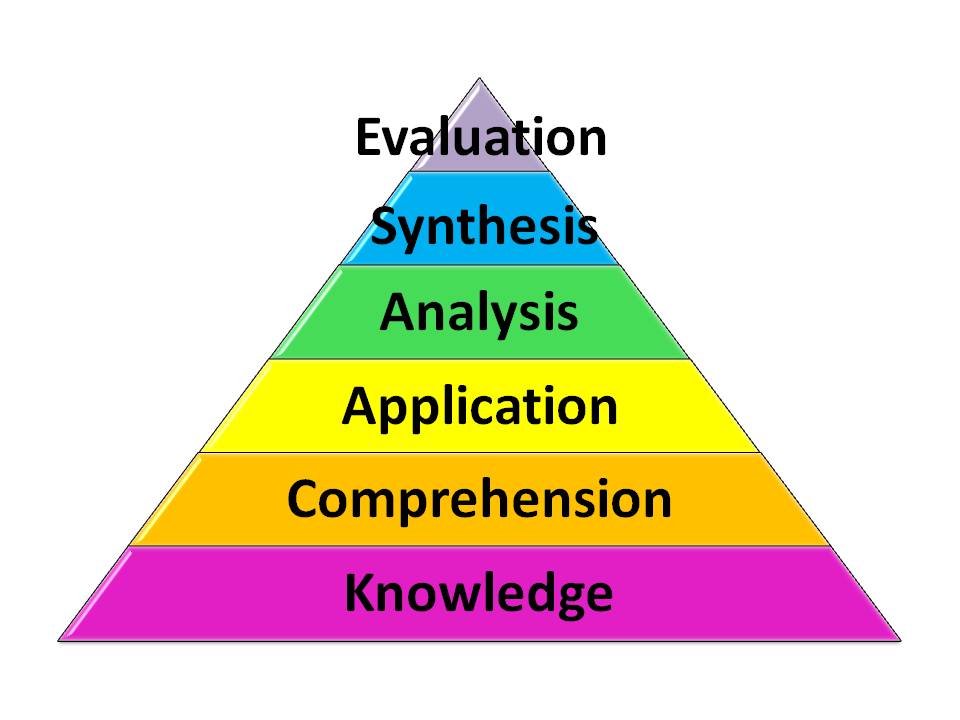
Here are some commonly used verbs for each of the six levels, listed in increasing order of the level of thinking skills required:
Knowledge- Define, Memorize, Repeat, Record, Label, Specify
Comprehension- Summarize, Describe, Explain, Identify, Translate
Application- Solve, Simulate, Apply, Illustrate, Exhibit
Analysis- Interpret, Compare, Categorize, Investigate, Discover
Synthesis- Plan, Imagine, Produce, Design, Predict
Evaluation- Judge, Assess, Measure, Conclude, Criticize
Resources:
NERC(2007) Guide to writing Learning Objectives. Retrieved from: http://www.nerc.com/files/Instructional_guide_writing_Objectives.pdf
Photo: http://www.odu.edu/educ/roverbau/Bloom/blooms_taxonomy.htm
Saturday, November 12, 2011
Learning Tool: AdeLE
Adaptive eLearning with Eye-tracking
Adaptive eLearning is a hot topic right now. Perhaps you have heard it referred to as adaptive training, intelligent tutoring system (ITS), or cognitive tutor, but in any case, adaptive eLearning is a learning system that intelligently adapts learning content to suit learner needs via a computer.
To learn more about adaptive learning, there is a great video and adaptive learning samples posted on the Adaptive eLearning website at UNSW.
In this post, however, I would like to take adaptive eLearning to the next level and advocate for the use of real-time eye-tracking in combination with the content-analysis tracking used by basic adaptive eLearning systems.
Lead by a research team in Austria, a protoype for Adaptive eLearning with eye-tracking is being developed. It is aptly named "AdeLE".
Resources:
Pivec, M, Trummer, & C. Pripfl, J. (2006). Eye-Tracking Adaptable e-Learning and Content Authoring Support. Informatica, 30, 83-86
Al-Khalifa, H.S. & George, R.P. (2010) Eye Tracking and e-Learning: Seeing Through Your Students' Eyes. ELearn Magazine, June 2010.
Gütl, C., Pivec, M., Trummer, C., García-Barrios, V.M., Mödritscher, F., Pripfl, J., & Umgeher, M. (2005). AdeLE (Adaptive e-Learning with Eye-Tracking): Theoretical Background, System Architecture and Application Scenarios. EURRODL 12-05.
Adaptive eLearning is a hot topic right now. Perhaps you have heard it referred to as adaptive training, intelligent tutoring system (ITS), or cognitive tutor, but in any case, adaptive eLearning is a learning system that intelligently adapts learning content to suit learner needs via a computer.
To learn more about adaptive learning, there is a great video and adaptive learning samples posted on the Adaptive eLearning website at UNSW.
In this post, however, I would like to take adaptive eLearning to the next level and advocate for the use of real-time eye-tracking in combination with the content-analysis tracking used by basic adaptive eLearning systems.
Lead by a research team in Austria, a protoype for Adaptive eLearning with eye-tracking is being developed. It is aptly named "AdeLE".
Resources:
Pivec, M, Trummer, & C. Pripfl, J. (2006). Eye-Tracking Adaptable e-Learning and Content Authoring Support. Informatica, 30, 83-86
Al-Khalifa, H.S. & George, R.P. (2010) Eye Tracking and e-Learning: Seeing Through Your Students' Eyes. ELearn Magazine, June 2010.
Gütl, C., Pivec, M., Trummer, C., García-Barrios, V.M., Mödritscher, F., Pripfl, J., & Umgeher, M. (2005). AdeLE (Adaptive e-Learning with Eye-Tracking): Theoretical Background, System Architecture and Application Scenarios. EURRODL 12-05.
Monday, October 31, 2011
Learning Design: Design Mapping Techniques
Design Mapping Techniques for Better Rapid eLearning Courses
Notes from #CETS11 - Chicago eLearning and Technology Showcase

Pictures and fonts are your "voice" in eLearning, and they set the tone and style of the learning experience. Design mapping is a great way to pre-design the visual layout of your eLearning. Elements of the design map include: Colors, Typography, People, Culture, Analogies, Metephors, Industry, and even Trade Magazines.
The above image, a design map template, and notes about design mapping from David Anderson himself can be found here: Using the Mind Map Template
Reference:
Anderson, D. (2011) Design Mapping Techniques for Better Rapid eLearning Courses. http://chicagoelearningshowcase.com/
Sunday, October 30, 2011
Learning Research: 2011 Horizon Report
The Horizon Report is an annual publication that outlines six emerging technologies or practices that are likely to enter mainstream use within higher education over a five year period of time.
Near-term Horizon (adoption within one year):
Electronic Books - an easy alternative to printed materials. Most allow for bookmarking, annotation, commentary, and dictionary lookup, and some allow for richly visual and interactive interfaces that include multimedia.
Mobiles - a viable alternative to laptops. Smartphones allow for web browsing, reading, watching videos, navigating, and playing games. They also provide access to the Apple or Android application markets. Mobiles can be used for anytime, anywhere and just-in-time learning.
Mid-term Horizon (adoption within two to three years):
Augmented Reality - A computer-assisted layer of information over the real world. Can be activated by visual metaphors and cues via a camera or location based cues via GPS systems. Allows learners to interact with virtual objects and view or annotate existing spaces with an overlay of information.
Game-based Learning - Can be goal-oriented, social, non-digital, or serious, ranging from paper-and-pencil games to massively, multiplayer online games. They allow for experimentation, exploration, problem-solving, and decision-making within a safe environment.
Far-term Horizon (adoption within four to five years):
Gesture-based Computing - a new era of interface design that foregoes the keyboard and mouse and opts instead for touching, tapping, swiping, and moving to engage with information. Approaches to gesture recognition can include applying pressure, motion, shaking, rotating, or tilting to manipulate interfaces and objects.
Learning Analytics - data collected from student activity in order to assess academic progress, predict future performance, and identify potential issues. Collected data includes assignments, social interactions, and discussions as a means to personalize educational opportunities for students.
Reference:
2011 Horizon Report. Retrieved from: http://wp.nmc.org/horizon2011/
Saturday, October 22, 2011
Learning Research: MOOCs
MOOCs (Massive Open Online Courses) are emerging as innovative educational solutions for the lifelong learner.
If you are unfamiliar with MOOCs, I encourage you to view a great introductory video found here prior to watching the below video.
This video outlines some of the key ideas surrounding MOOCs as well as some of the advantages and disadvantages of this new learning frontier using CCK08 as a basis for discussion.
If you are interested in participating in a MOOC, you can register for the Change MOOC here, or you can register for the 2011 installment of the CCK (Connectivism and Connective Knowledge) MOOC here. In addition, the MOOC entry on Wikipedia is often updated when a new MOOC is being formed.
Resources:
de Waard, I. (2008). Explore a New Learning Frontier: MOOCs. Learning Solutions Magazine. Retrieved from: http://www.learningsolutionsmag.com/articles/721/explore-a-new-learning-frontier-moocs
Mackness, J., Mak, S.F.J. & Williams, R. (2009). The Ideals and Reality of Participating in a MOOC. Networked Learning Conference 2010, Denmark.
This video outlines some of the key ideas surrounding MOOCs as well as some of the advantages and disadvantages of this new learning frontier using CCK08 as a basis for discussion.
If you are interested in participating in a MOOC, you can register for the Change MOOC here, or you can register for the 2011 installment of the CCK (Connectivism and Connective Knowledge) MOOC here. In addition, the MOOC entry on Wikipedia is often updated when a new MOOC is being formed.
Resources:
de Waard, I. (2008). Explore a New Learning Frontier: MOOCs. Learning Solutions Magazine. Retrieved from: http://www.learningsolutionsmag.com/articles/721/explore-a-new-learning-frontier-moocs
Mackness, J., Mak, S.F.J. & Williams, R. (2009). The Ideals and Reality of Participating in a MOOC. Networked Learning Conference 2010, Denmark.
Wednesday, August 31, 2011
Learning Design: Scenario Based eLearning
Scenario based eLearning
Notes from #CETS11 - Chicago eLearning and Technology Showcase
Traditional scenario based learning:
- Uses real life situations to teach the subject focusing on application of knowledge
- Presents real life situations in order to learn through feedback based on choices
- Creates highly engaging and interactive courses where learner is active participant
The basic premise of a scenario is that the learner is presented a challenge and a number of choices that can be made based on the situation. Depending on the learner's decision, the learner is presented feedback and/or a specific consequence of the action as outlined in the flowchart below:

Components of a scenario:
- Background/ Context
- Character(s)
- Situation
- Word bubbles/ audio
- Action items
- Consequence/ feedback
Challenges of scenario based learning:
- LMS or eLearning platform does not allow branching
- Lack of time - design and development of scenario based eLearning takes approximately 120 hours per 1 hour of learning
- Lack of SME involvement - scenarios require heavy content input from SMEs
References:
Weiss, T. (2011) Creating Scenario-Based Learning Using Rapid eLearning Tools. http://chicagoelearningshowcase.com/
Image: http://blog.commlabindia.com/wp-content/uploads/2013/05/design-effective-scenarios-for-elearning-courses.jpg
Notes from #CETS11 - Chicago eLearning and Technology Showcase
Traditional scenario based learning:
- Uses real life situations to teach the subject focusing on application of knowledge
- Presents real life situations in order to learn through feedback based on choices
- Creates highly engaging and interactive courses where learner is active participant
The basic premise of a scenario is that the learner is presented a challenge and a number of choices that can be made based on the situation. Depending on the learner's decision, the learner is presented feedback and/or a specific consequence of the action as outlined in the flowchart below:

Components of a scenario:
- Background/ Context
- Character(s)
- Situation
- Word bubbles/ audio
- Action items
- Consequence/ feedback
Challenges of scenario based learning:
- LMS or eLearning platform does not allow branching
- Lack of time - design and development of scenario based eLearning takes approximately 120 hours per 1 hour of learning
- Lack of SME involvement - scenarios require heavy content input from SMEs
References:
Weiss, T. (2011) Creating Scenario-Based Learning Using Rapid eLearning Tools. http://chicagoelearningshowcase.com/
Image: http://blog.commlabindia.com/wp-content/uploads/2013/05/design-effective-scenarios-for-elearning-courses.jpg
Subscribe to:
Posts (Atom)